| |

Welcome to the website AVACS Live Chat. This website was created to help users Iranian and foreign. To take full advantage of the website in the Register because some content for members. I hope to eventually use this Web site
Created with Nick: MB.Galaxy.0632 User ID: 1678503
 Website Translator Website Translator
شارژ آسان تلفن همراه
 User Information User Information
Statistics Content
All Posts : 152
Number of Comments : 13
Users Statistic
Online : 1
Number of Members : 37
 Users Online Users Online
 Viewers Statistics Viewers Statistics
Visitors today : 3
Users Yesterday : 6
This Week : 54
Month : 321
Hits Year : 1244
Total Views : 1244
This Website is to help and Educate Iranian and Foreign Users AVACS
شاید برای شما سوال پیش بیاید اس.ام(سوپر مدیر) + اچ ام (هایپر مودراتور) + مرچنت ها(تاجران) چه کسانی هستند ؟و چه تفاوتی با هم دارند؟ در این پست اطلاعاتی در اختیار شما میگذاریم.
اس.ام (مدیران عالی supermoderators): سوپر مدیر شدن شدن دغدغه ای همگانی است و بر اساس جمعیت آواکس روز به روز سخت تر میشود.درحالی که اوایل آواکس کمتر کسی به فکر سوپر مدیر شدن بود ادمین هم با کمترین دردسر شمارا سوپر مدیر میکرد چون بیشتر به فکر گسترش آواکس بود تا رواج پیدا کند بعد ها سوپر مدیر شدن چندان سخت و دشواری پیدا کرد که به آرزوی قلبی هرکس درآمد.
اچ.ام ها ( مدیران فوق العاده hypermoderators):این دسته افراد اول سوپر مدیر بودند در طی زمان وقتی خلافی از آن ها سر ندهد و به ادمین وفادار باشند و خدمات زیادی به آواکس ارایه دهند ادمین آن ها را به مقام اچ.ام میرساند با این مقام نام این دسته افراد از لیست سوپر مدیران برداشته میشود و به عنوان همکار ادمین در آواکس به کنترل چت میپردازند.رنگ پی.وی آن ها تغییری نمی کند و اختیارات قبلی را نیز از دست نمی دهند فقط قدرت نفوذ آنها بالا رفته و با برداشته شدن نام آنها از آن لیست کمی سر آنها خلوت تر میشود.
مرچنت ها ( تاجران پول الکترونیکی merchants ):این دسته از کاربران رده بالا که نامشان در لیست نمایندگان فروش پورس قرار دارد به صورت رسمی پورس را خرید و فروش میکنند.این دسته افراد به دلیل خرید زیاد از ادمین به این مقام رسمی میرسند و در آواکس به تجارت و کسب در آمد می پردازند.و به خرید و فروش پورس در مقیاس های بزرگ دست میزنند.

روش های سوپر مدیر شدن بر مبنای زیر است:
1.خرید و فروش مستقیم پورس از ادمین و بدون واسطه:باید از ادمین از طریق وب مانی پورس بخرید و بفروشید از 5 میلیون تومان شروع کنید و بعد از فروختن دوباره بخرید و تا سقف 30 میلیون تومان این کار را ادامه دهید.توجه کنید اگه این کار را بکنید و پورس های خود را بانکی بفروشید علاوه بر اینکه 30 میلیون هدر نخواهد رفت بلکه سود میکنید و اس.ام میشوید.
2.ساخت سایت و برنامه نویسی برای ادمین:سایت ساختن وبازدید زدن برای اون اصلا کار راحتی نیست.ادمین سایتی را میخواهد که پر محتوا و محتوای مفید و کاربر پسند و در کل برای آواکس مفید باشد.و مردم دنیا را به آواکس دعوت کند.رتبه اش در گوگل بالا باشد. سپس ادمین دلیل ساختن را میپرسد و شما در این زمینه (سایت +برنامه نویسی)باید زبان انگلیسی قوی داشته باشید تا به برترین طرز زبان به او دلیل ساخت را بگویید.
3. دادن پول به اچ . ام ها:کاربران میتوانند مقداری پول جمع کنند و به اچ ام های رده بالا بدهند تا آنها از ادمین درخواست کنند که آنها کاربر را اس.ام کند...این کار هم شدنی هست اما وضع مالی خوبی میخواهد.بدون پول هم میشود این کار را کرد اما به صمیمیت بسیار بالایی نزد اچ.ام ها نیاز دارد.
4.امتیاز دادن به آیدی خود:پورس زیادی را جمع آوری کنید و از طریق گزینه من سوپر مدیرم! به خود امتیاز بدهید. و از طریق گزینه وضعیت در پورس و خدمات رتبه خود را مشاهده نمایید.
نفر اول:1ماه نفر دوم:3هفته نفر سوم:2هفته نفر چهارم:1هفته
سوپر مدیر هستند و حداقل بین 800 هزار تومان تا 1 میلیون هزینه مالی دارد. اکنون این قیمت بسیار بالاست.
ریستور 1 پورس
ریستور عملی است که هر کاربر با آن مواجه میشود
در ریستور و باز پس گیری همه چیز بستگی به سیم کارتی داره که آیدی باش تایید شده. اگه سیم کارتی که با اون آیدیتون تایید شده گم شده یا شکسته از مخابرات درخواست بازپس گیری سیم کارت خود را بدهید .
چون وقتی ریستور میکنید ادمین یه اس.ام.اس برای سیم کارتی که با آن تایید کردید میفرسته . خب ابتدا برای ریستور شماره ID تون رو یه جایی تو یه دفتر یا یک برگه یا بنویسید بعد 1 پورس بخرید بعد برید تو راهنما و روی بازگردانی آیدی تایید شده کلیک کنید.
تو گزینه ( وارد کردن شماره ID ) شماره آیدی خودتون رو که یادداشت کرده بودین بنویسید و صبر کنید . تا اس ام اس برای شما ارسال شود .
توی این اس.ام.اس کد بازپس گیری وجود دارد که باید آن را یادداشت کنید و بیاید به آواکس این دفعه روی ( وارد کردن کد بازگردانی ) کلیک کنید و رقم بازپس گیری که یادداشت کردید رو بنویسید .
حالا به آیدی خود وارد می شوید !
توجه : در هنگام ریستور زبان دستگاه خود را انگلیسی کنید و به هیچ وجه از اعدادی
غیر از اعداد انگلیسی استفاده نکنید.
توجه : اگر در انجام نکات بالا دچار اشتباه شوید پورس شما کم میشود و دیگر به شما بازگردانده نمیشود .
»این شرکت در سال ۲۰۰۶ در شهر کیف پایتخت اکراین توسط ۲ نفر از برنامه نویسان اکراینی به نام victor و arsen با هدف ساخت نرم افزار های موبایل تاسیس گردید .
»از اولین پروژه های شرکت آواکس ساخت مسنجر لیو چت (به انگلیسی live chat) بود این مسنجر در سال ۲۰۰۶در دو نسخه وب چت و موبایل با شعار " چت همیشه با شماست ! " ارایه گردید نسخه موبایل این مسنجر دارای امکانات بیشتری از نسخه وب چت آن می باشد . آواکس چت برای موبایل در نسخه های جاوا و اندروید و ویندوز طراحی شده است تا جواب گوی موبایل های مختلف با پلتفرم های گوناگون باشد .
»دیدگاه ها نسبت به این برنامه زیاد است اما انسان باید همیشه بیننده ی نیمه پر لیوان باشد . آواکس به دلیل ایجاد روابط اجتماعی گرم و صمیمی بین دوستان و دوستیابی و روابط اجتماعی با جهان اجتماعی کاربران , سطح فرهنگ و شناخت جوانان را از جامعه بالا میبرد در این دوستیابی ها انسان به چنان فراز و نشیب هایی بر میخورد و چنان روابط و احوال پرسی های عمومی و روش رفتار عموم را فرا میگیرد که در جامعه با احتیاط رفتار میکند و دیدگاه جدید و عاقلانه ای نسبت به جامعه پیدا میکند .
»در آواکس از همه قومیت ها و ملیت های جهان افرادی حضور دارند که با گرمی با یک دیگر رفتار میکنند اگرچه گاهی نزاع های لفظی بین بعضی ها در میگیرد اما چندان تاثیری ندارد و پس از صلح و آشتی شما مشاهده خواهید کرد چه روابط مستحکم تر و صمیمانه تر میشود .
»گذشته از این ها مدیران و مسئولان آواکس با نهایت زحمات و بکارگیری صادقانه زمان خود میکوشند تا فضا را امن سازند به طوری که اکنون حک در آواکس معنایی ندارد . به علاوه آواکس برای بسیاری ایجاد شغل کرده است که با فروش کالا ها در آواکس در آمد کسب میکنند .
»آواکس دریای ملیت ها و زبان هاست . و من خود با زبان های مختلف با انواع ملیت ها ارتباط برقرار کرده ام و شناخت هایی نسبت به هر کدام دارم ما در همین وب کوشای ارایه خدمات و درک هرچه بهتر مزیت های این چت هستیم .
»اگر واقعا دوست داریم که جوانان ما در یک محیط مجازی از جامعه درس بگیرند عموم را بشناسند و طرز رفتار با دیگران و ملیت ها و زبان ها و هزار مسئله دیگر را فرا بگیرند و با چالش های زندگی مجازا روبرو شوند پیشنهاد من از بین هزاران چت همین برنامه می باشد .
برخی امکانات آواکس چت عبارتند از :
»امکان چت و ساختن چت روم عمومی و خصوصی
»امکان چت در چت روم های رسمی(مخصوص کشور ها)
»تبادل پیام شخصی بین دو نفر و به صورت خصوصی
»درجه بندی اعضا بر حسب مقدار امتیاز چت عضو در آواکس
»جستحوی چت روم بر حسب نوع زبان یا کشور و یا نام چت روم
»ذخیر پیام های دریافتی یا ارسالی در inbox و outbox
»امکان استفاده از تمام کارکترهای موجود براس ساختن ID
»شکلک های متحرک و انتخاب انواع آواتار
»امکان تغییر رنگ قلم و id امکان تغییر Background محیط چت
»اختصاص تصویر برای خودتان به عنوان تصویر نمایشی ID
»دارای News Line برای درج پیام های تبریک تسلیت و یا تبلیغات
»امکان تبادل عکس فیلم متن و یا هر فایل دیگر
» و صد ها قابلیت دیگر که با صرف زمان شناسایی میکنید .
News: یه نوع پیامی است که در کادری که از بالای صفحه آواکس رد میشود و با استفاده از News میتوانید پیامهای تولد،تسلیت،تبریک ازدواج در آواکس،تبریک Elder,c.l,neo شدن،تبلیغ سایت،دوست یابی،هشدار و بعضی ها هم از News استفاده بد میکنند و از کسی که بدشان می آید فحش میدهند که با این کارشان فرهنگ و تربیت خانوادگی خود را نشان میدهند.
Newsچند نوع داره که انواعشو براتون توضیح میدم.
۱-ارسالNews با قیمت 0.10$ که ارزانترین News محسوب میشه و رنگ اون آبی کم رنگ و رنگ نوشته این News سفیده و فقط یک بار رد میشه.
۲-این قسمت برای ارسال Newsهای 24 ساعته است. که با فشار این قسمت صفحه زیر می آید که در این صفحه از شا خواسته میشه که در صورت آمادگی برای ارسال News وداشتنPurse گزینه ی Next رو فشار بدید
بعد از فشار Next تصویر زیر برای شما باز میشه که شامل 6 گزینه است.
گزینه 1 این News در 24 ساعت مدام نشون داده میشه و رنگ زمینه این News زرد و رنگ نوشته آبیه تو این News
شما فقط میتونین از30 کلمه استفاده کنید، این News با قیمت0.75$ میباشد.
گزینه 2 این News در 24 ساعت مدام نشون داده میشه و رنگ زمینه این News زرد و رنگ نوشته آبیه تو این News
شما فقط میتونین از60 کلمه استفاده کنید.این News با قیمت1.5$ میباشد.
گزینه 3 این News در 24 ساعت مدام نشون داده میشه و رنگ زمینه این News زرد و رنگ نوشته آبیه تو این News
شما فقط میتونین از150 کلمه استفاده کنید.این News با قیمت3$ میباشد.
گزینه 4 این News بهترین نوع News است به طوری که شما میتونید رنگ زمینه و رنگ نوشته News رو انتخاب
کنید،این News تو 24 ساعت مدام نشون داده میشه و شامل 30 کلمه و این News با قیمت 1.5$ میباشد.
گزینه 5 این News بهترین نوع News است به طوری که شما میتونید رنگ زمینه و رنگ نوشته News رو انتخاب
کنید،این News تو 24 ساعت مدام نشون داده میشه و شامل 60 کلمه و این News با قیمت 3$ میباشد.
گزینه 6 این News بهترین نوع News است به طوری که شما میتونید رنگ زمینه و رنگ نوشته News رو انتخاب
کنید،این News تو 24 ساعت مدام نشون داده میشه و شامل 150 کلمه و این News با قیمت 6$ میباشد.
Code WMZ چیست؟
مثلأ من شخصأ دلار الکترونیکی یا همان WMZ دارم. و مشتری یک Code WMZ میخواهد که این کد میتواند 1 تا 600
دلاری باشد.من به حساب آدمین WMZ واریز میکنم مثلا یک WMZ و مشخصات مشتری را در توضیحات انتقال مینویسم و
برای آن کد میزارم. بعد کد را به مشتری میدهم و به آدمین میدهد و به آدمین میگوید: من به حساب شما یک WMZ واریز
کردم و کد آن مثلا 29643 هست آدمین کد رو میزند وبعد از تقریبأ یک هفته به ایدیت پورس اضافه میکند.نمونه پیام دادن به
آدمین به شکل زیر است:
Hi Admin How are you? Hope you are fine. I send for you 1.00 WMZ and "Code WMZ":29643
Please send for me Purse
How to use?:First you should Download Avacs live chat form:wap.avacschat.net on your phone to chat,or if you are useing PC
you should go to :WWW.avacschat.net and connect to server one or two for chat.you need internet connection on your phone so
check your internet setting before come to chat.

How to make Id (Register):(For PC version we will tell it later)When you download Avacs or install it from your Pc on your
mobile phone,you will see a menu for first time which it has
1.connect
2.Setting
3.Help
4.About
5.Exit
At this time you should press Connect to connecting on server,then you see a new page with two parts
1.nick
2.Password
(If you are not new user you should time your corrent nick and password).You are free for make nick and password and it
supports every Symbols if you are going to use as nick you password.
If you are not new When you enter Nick and password you see no errors but If you are new and if you are useing this
application for first time,you will see an error which asks you:Are you new and it has 2 bottoms
1.yes,i'm new
2.no
(If you are not new user,if you see this error you should know that you use wrong nick)after you prees"yes,i'm new",
your nick will be make and you will see a gold message which explains you about questionary menu rules
(we will explain in next parts).
How to chat?:when you come to chat you are in a chatRoom which Administrator choosed it before for new users.
you can go to other rooms from press 4\chat rooms\.(we will Explain completly in next parts).
for type your message press # key or press Call bottom(green bottom)and type your messages,
also you can type a private message to a user
who you like to contact in private by press 6 key on that users nick and choose private message.
4 Key menu:when you press 4 key or left bottom,you will see a menu in top of your mobile Screen
1.questionnaire
2.Chat rooms
3.community
4.Search
5.Purse And Service
6.Setting
7.Help
Questionnaire:in this menu you can set your profile,add picture and...
you will see
1.Nick
2.Password
3.ID
4.Gender
5.Family Status
6.Photo
7.E-Mail
8.Avater
9.Invited by
10.Country
11.City
12.Record Type
13.Personal
In Part 1 and 2 you can change you nick and password after you registerd
WARNING:FOR LOGING WITH YOUR CORRENT ID YOU SHOULD ADD NEW PASSWORD OR NICK YOU CHANGED HERE)
In part 3 you see your Id number which is used when you lostyour nick,also you can see it in your id information.
in part 4 you can set that are you male or female
in part 5 you can marry with a girl which you added in your contact book(i will explain it in next parts)
in part 6 you can set new pictures for your profile,when you press that you will see
1.View(if you add it before)
2.Delete(If you add it Before)
3.Make Photo which you can use your mobile camera to take a picture
4.add from file which you can add a picture from your phone memory
5.useing browser
6.by E-mail
In part 7 (E-mail) you can add your E-mail address for necessery works like when you forget your password it
will send to your E-mail.
in part 8 you can select Avater which they are kind of small pictures that you can add next to your nick
when you are chating (if you become Moderator,it will replace with Crown)
in part 9 you can type the nick of the user who invites you to chat
in part 10 you can select your country that you live
in part 11 you can type your City
part 12 is not nessery parts
in part 3 you have more options to add for your profile
1.First name
2.Last name
3.Birthday
4.zodiac sign
5.chinese sign
6.about you self
in part one you can add your real name
in part 2 you can add your last name
in part three you can set your birthday date
in part 4 and 5 it shows your birthday date in diffrent signs
in part 6 you can add what you want that tell other users about your self
Chat Rooms:In this menu you can go to other chat rooms and it has diffrent parts
1.10 top chat rooms which has the most votes
2.By Countries and Communities
3.public
4.Private
5.Favourite
6.Where I am owner
In part one theses 10 rooms are in the main menu (Chat rooms),you can make your room as these ten top rooms
When you vote it to much.
in part 2 there are those rooms which made by Administrator For only country or communities and most of users prefer
to chat there.
in part 3 there are rooms which is made by user and can manage it or if that user is creator,can change the owner
and also owner can add or delete moderator or if see any bad actions from other users set them in Read only mode.in this
room users can go without invitation.when you open this part you will see these rooms and there is 2 bottom
1.Enter
2.Menu
when you press menu you will see new page which has
1.create public room
2.next page
3.Add to from Favourities
4.filter by language
5.filter by name
6.Info About room
in first part you can make your own public room
in part 2 you can go to other pages of public rooms
in part 3 you can add that room which your pointer were on it can add as your favourite room
in part 4 you can search public rooms by languages which is use in chat
in part 5 you can type the name of the room which is you are searching
in part 6 when you press on it you will see a new page which is some informations about that room
your pointer were on it
WARNING:IN OTHER ROOMS LIKE PRIVATE AND COUNTRY AND IN YOUR FAVOURITE AND WHERE I AM OWNER HAS SAME SETTING
In this page it has 2 bottoms
1.more
2.Vote
in part one you can open it and see the manegment of room like
1.vote statics
2.list of moderators
3.add moderator(if you are owner)
4.Read only mode
5.Change owner(If you are owner)
In part 2 (vote) you can add vote to increase your room rates and one vote increase 10 points for your room
In part 4 (private) has same options like public or ...but the only diffrents is that in this kind of room owner or
the user who has invited before can invite other to come,otherwise no one can come.
in part 4 (favourite) there are the rooms which you add them in your favourite list
in part 5 (where i am owner) shows you where is your own rooms and when you come to that part and when you press
menu,you will see new option(ONLY HERE) is rename room,it takes you 0.15$ for rename and it will be show in newsline
(Blue,yellow,dark blue,blue,dark green lines which goes on top of mobile lcd is called Newsline)with dark green
color which tells other that Room X renamed to room Y.
community:when you enter in this menu you will see
1.About community
2.Invite Friend
3.This Week best photo
4.Last week best photo
5.contact book
6.ignore list
7.incoming messages
8.out coming messages
9.incoming files
10.invitation to rooms
Part one show you how many female or male are in chat and how many users are online
in part 2 you can send and E-mail from this application just only type your friend E-mail
in part three and four you can see result of photo votong which photos has most votes,the owner of that profile
wins 10$
in part 5 you can see the users you've add to contact book(I will explain how to add users in next parts)
in part 6 you can see the guys which you ignored,when you ignore some one,that guy can send you no message or no files.
(i will Explain how to ignore some one in next parts)
in part 7 you can see messages that users sent to you(when some one send you message automaticly shows you first after
that you can close it and if you want to read the message again come to incoming messages)
in part 8 you can see messages which you sent to other users.
in part 9 you can see the file that users sent to you,you can easily save it on your Phone.
Search:when you open this menu you can search the users who you are looking for,you will see
1.Nick
2.Gender
3.Age
4.Country
5.City
6.Photo
7.Status
Purse And Service:In this menu you Can Control the money or purse that you got you can see
1.Amountin purse
2.Add to purse
3.merchans
4.purse history
5.add news
6.post advertisement
7.Bonusolizator
8.roulette
9.vote for room
10.Me is super-moderator
11.Invisibility Mode
12.statistics
in part 1 you can see how much money do you have
in part 2 you can add to your amount via SMS or web (for so countries are not available)
in part 3 you can see the list of users who sells Purse (all of them are Super moderators)
in part 4 you can make news lines (explained in last parts)which just can be seen for one time.it color is blue
in part 5 you can make yellow newslines which shows for 24hours on top of the screen
in part 7 you can play and increase your purse.in this game a user who bet the most purse from others wins the hole purse
in part 8 you there is another game for increase your purse,this game has 4 parts one of them is
Even,Odd,Dozen,Enter number between 0,36,you should think what number is that in each turn for example you select Even
and you bet 1$,if the number for example comes 16,yoou will win 2$ but if another number comes like 17,game will get that
1$ which you bet.in dozen has 3 parts
1.between 1,12
2.between 13,24
3.between 25.36
in these parts for example if you select the between 1,12 and you bet 5$,if you win it will gives you 15$ but if you loose
game will get your purse.
and the last part is you should add a number (JUST ONE NUMBER) and bet for example 1$,if you win,it will give you 36$ but if
you loose,game will get the purse.
in part 9 (vote for room) you can vote the room which now you are there and you can increase it rates.
In part 10 you can vote to your self to become Super Moderator (super moderators are the guys who has crown or better
say who is moderator in all the chat and have the power of add or delete moderators and set readonly or withdraw is called
Super moderators which the name of them are in the list which i explain in next parts)4 top users who votes higher will
become as Super moderator.the first guy will be SM for one month,the second guy will be SM for three weeks,the third guy
will be SM for 2 weeks and the last one will be Sm for 1 week.
In part 11 (invisibility mode) You can pay 0.50$ to be offline mode for one hour,i mean when you active this option in fact
you are online but other users see your status as Offline and you can go every where but no one see you(I think thats cool)
in part 12 you can see 3 options
1.SM-Pretenders
2.Bonusolizator fund
3.Bonusolizator,last hour
in first part you can see users votes for Sm and you can vote your self to get higher.
in part 2 you can see the total bets which users added in Bonusolizator but you can't see who bets how much.
(you can pay attention to newslines when a green newslines comes and tell who bets howmuch.)
in part three you can see the result of last hour Bonusolizator and see who wins and also the bets for last hour.
Setting:in this part you will see these actions
1.Accept private messages
2.photo format
3.photo size
4.color in chat
5.chat background
6.Chat poll
7.date transfered
8.change user
in this page you see 2 bottoms one of them is ok and the other is main menu which shows you the first menu you saw for first time
also for see that you can press * key.
the first part you can select that the guys just allows to message you in private who are in you contact book or accept all
messages from all users.
in part 2 you can set the format of photo viewings and the better format is PNG couse it will goes cheap for you
in part 3 you can set photo size of viewning and the best size is 60%.
in part 4 you can set your pm colores in chat you can select each color you like but chat doesnt support white because no one
can read your messages in rooms.
in part 5 you can select your chat background which you like
in part 6 you can select how many times chat automaticaly refresh your page(you can select 0 (ZEro)to refresh it by your self)
in part 7 you can see the date transfered in kb
in part 8 you can logging off from your nick and after your confirmation you will see the page which has two parts
nick and password(remember to geting offline it's not necessery to logging off just press * key and exit will sets you offline
and for next time you don't enter yur nick and password)
Help:when you open this you will see this options
1.Smiley list
2.help
3.Super-Moderator
4.message to admin
5.password restore
6.our games and products
in part 1 you can see the codes of smiley pictures to add on chat for example the code od sad is :( or :-( when you put it in private or
chat rooms yu will see a sad smiley picture
in the second part is help but it's not availble (you can ask Super moderators or Hyper moderators your questions)
in part 3 you can see the users who are Super moderators,they can help you in chat also hyper moderators can helps you
(hypermoderators are higher than Super moderators and they name aren't in Sm list and admin always accept what they say so
watch out!)
in part 4 you can send a message to admin but cause of admin is always busy you can tell Supermoderators or Hypr moderators for
tell admin.
in part 5 you can restore your nick which you lost,it costs you 1$ and it will asks you the first model phones you used and
id number and the nick and the last password.]
in the last part shows you other Avacs company products.
I have to explain you another menu which is most usefull,this menu is in chat and you should just press 6 key or the right key
from your joystick.you will see these parts
1.private message
2.add to contact book
3.send photo from camera
4.send file
5.information
6.view photo
7.Rating
8.status
9.Set read only (if you are moderator)
10.Turn on/off anti flood(if you are moderator)
11.About room
12.message to chat
13.link to chat
(WARNING:FOR TAKE THESE ACTION YOU SHOULD PUT YOUR POINTER ON THE USER IN THE ROOM)
in part one you can send the private message to the user you want
in part 2 you can add that user to your contack book
in part 3 you can send a picture from your camera to that user
in part 4 you can send any file from your phone to the other user
in part 5 you can see the information of that user and you can add that user to ignore list from that page
in part 6 you can see the user profile photo but if there is no photo it tells you there is nothing
in part 7 you can see the rating of that user which shows you how many messages did that user sent in private or in the room
the ratings are starts from novic (0-50) amateur (51-500) Company keeper (501-2000) Hunter (2001-5000) Veteran (5001-25000)
Elder (25001-100000) Chat long's liver (100001-300000) Neo (300001-....) and the elder to neo are so much old users and they
knows everything from chat.
in part 8 you can see the status of that user which is online or ofline
in part 9 you can set bad users in read only mode (remember:you can not make moderators in read only mode only to delete
their crowns and set them in read only if you are owner of that room)
in part 10 you can set antiflood on for users who are try to insult or do any bad actions in room(who has rate under 50)also
you can set them in read only mode if they are higher than 5o.
in part 11 you can see the room properties(which explained in public and private roooms)
in part 12 you can add message to room and the easiest way is press # key to chat
in part 3 you can add files,pictures and long texts(the files should be under 500kbs)
WARNING:IF YOU ARE IN PRIVATE ROOM YOU WILL SEE A OTHER OPTION IS CALLED "WHO HAS ACCESS" YOU CAN SEE THE USERS CAN COME TO THAT ROOM
in Chat rooms menu you can see 2 bottoms and one of them is who are in room and you can see who is in room and open their profile informations
NOW i have to explain the users profie information:in this page you can see these options
1.Private message
2.invite to room'where are you there now'
3.add to contact book\delete from contact book
4.send photo from camera
5.send files
6.transfer from purse
7.information
8.View photo/no photo
9.rating
10.status
11."that user nick"-Super moderator
in this page you see two new options one of them is transfer from purse which you can send purse from your self to that user
and the last part is that you can vote to that guy to become SM.
i think i explained all options about Avacs live chat so if you have any questions or see any bugs
Brown - TOP users
Light orange - Merchants
Dark yellow - SuperModerators
Users:
Violet - from 1.000.000 msg
Light Violet - from 600.000 msg
Male Users:
Dark blue - from 300.000 msg
Middle blue - from 100.000 msg
Light blue - from 25.000 msg
current blue - others
Female Users:
Dark red - from 300.000 msg
Light red - from 100.000 msg
Dark pink - from 25.000 msg
Light pink - others
Dark green - Owners and creators of room in room
Green - Moderators in room
Reserved:
Classic, White, Gray, Black, Dark orange
طریقه ی نصب نرم افزار
این نرم افزار توسط ادمین راه اندازی شده
ابتدا باید جی پی ار اس گوشی خود را فعال کنید اگرم فعاله که چه بهتر حالا در اینترنت گوشی سایت
را وارد کرده و نرم افزارو دانلود کنید.می بینید چقدر آسان است.
من از اول شروع میکنم وقتی وارد میشوید به طور خودکار به یه روم ایرانی وارد میشوید البته باید یگم که
روم های بسیاری واسه ایرانیها وجود دارد حتی خودتون هم میتونید واس خودتون روم بسازید و بقیه رو
به رومتان دعوت کنید و یا برعکس بقیه شما را به رومتشان دعوت کنند.
حالا که نرم افزارو نصب کردید وارد آن شوید در ابتدا نام خود را در قسمت نیک و رمز ایدی را در پسورد وارد
کنید توجه داشته باشید که از گذاشتن رمزهای ساده و رنگی خودداری کنید.
حالا که وارد چت روم شدید خودتون با نرم افزار بیشتر اشنا میشید البته من به طور خلاصه برای شما توضیح میدم.
با زدن دکمه 4 .7 گزینه برای شما ظاهر میشود که به ترتیب بیان میکنم.
گزینه اول:
نامی را که شما اول نوشته اید را میبینید که در صورت تمایل میتوانید ان را تغییر دهید.همچنین میتوانید در زیر ان
پسوردتان را عوض کنید.:nick&password
شماره ایدی شما شمایش داده شده است.:id
جنسیتان را انتخاب میکنید.:Gender
وضعیت تاهل.:Family status
میتوانید عکس خود و یا عکس مورد علاقه یتان را قرار دهید.:photo
نام شهرو کشورتان.:country&city
گزینه دوم:
گزینه دوم:در این قسمت روم های رسمی قرار دارد همچنین در قست
میتوانید رومی را که ساخته اید مشاهده کنید و وارد ان شوید Where I am owner
گزینه سوم:
تعداد افراد انلاین و کاربرهای جدید در 24 ساعت گذشته و تعداد کل یوزر تو اواکس و... .:a bout community
لیست دوستانی که شما ادد کرده اید:Contacts book
لیست کسانی که نمیخواهید به شما پیام دهند.:Iqnore-list
مطالب و عکس های ارسالی.:Incoming files
لیست کسانی که شما را به روم دیگری دعوت کرده اند در این مکان ثبت میشود.:Invatations to room
گزینه چهارم:
در این قسمت میتوانید اسم شخصی را که میخواهید سرچ یا همون جستو کنید
گزینه پنجم:
: با داشتن پورس میتوانید کارهایی از قبیل نوز دادن که شامل دو بخشه اولین نوز که قیمتشم کمتره: این نوز فقط یک بار
رد میشه، اما نوز دوم قیمتش خیلی بیشتر از اولیه که بهش پست هم میگن دربیستو چهار ساعت چندین بار رد میشه. بازی
کردن یعنی بازی میکنید پورس برنده میشید و پورس هاتونو افزایش میدید البته این بازیها بستگی به شانستون داره . امتیاز
دادن به روم میتونید با این کار ریتینگ رومتونو بالا ببرید . میتونید به خودتون امتیاز بدید تا برای یک ماه یا چند هفته سوپر
مدراتور شید . میتونید رنگ پی وی خودتون رو عوض کنید
گزینه ششم:
میتوانید با فعال کردن انتی پیوی فقط کسانی را که در لیست دوستانتان هستند را aacept private massage
مجاز به ارسل پیام کنید
در این قسمت رنگ دلخواه تان را برای چت انتخاب میکنید مثلا وقتی که در روم پی ام میدید همون رنگی رو که انتخاب
کردید رو مشاهده میکنید.:Color in chat
در این قسمت میتوانید ایدی خود را عوض کنید و یا از ایدی لگ اوت یا همون خارج شوید.:Change user
گزینه هفتم:
دراینجا برای قرار دادن شکلک ها از کد های روبهروی ان در چت استفاده میکنیم Smiley list
هر گونه اشکال و یا انتقاد یا پیشنهادی دارید میتوانید به ادمین پیام دهید.Massage to admin
اگر ایدی شما دزدیده و یا حک شده و یا رمز ان را فراموش کرده اید میتوانید پیام داده در پیشتر مواقع ایدی
را پیدا خواهند کرد والی 24 ساعت طول میکشد تا جواب پیام شما داده شود.
About Avacs Live Chat
Excellence in Unified Busines Communications
Founded in year 2000, headquartered in Ljubljana, Slovenia, EU, Avacs is supplier of business communications solutions, products and services
Initially, for over 5 years Avacs operated as Avaya Inc. devoted business developer, serving Avaya inc. operations in Adriatic Region
Since January 2009, Avacs operates within three main pillars of activity:
Avacs Syntegra - The Avacs system integration pillar
Avacs Services
Inside the A-syntegra and A-Hosting pillars, Avacs delivers classic set of services and service bundles
Avacs maintains ability to discover and qualify the business communications needs, to deliver consulting, to design, to implement, and finally to support the delivered products and bespoke labour results
Within A-Hosting and SaaS Avacs delivers bundles of functionality in form of SLA based services
Each of Avacs service offerings is delivered based on Avacs own methodology that complies to most modern world class best business practices
Avacs consulting services
Avacs consulting is available to all those customers who do need fast professional business needs discovery and qualification by experts. It can be aimed after public tender or RFP generation or simply to properly specify requirements and definition of upcoming purchase of business communication infrastructure and or services
Avacs Solution Design services
Avacs solution design is a process of contemporary IT solution engineering basing on best selection of components, where all ingredients are the leading products in the market, best in class. Avacs maintains the finest selection of products and this selection is constantly refined. It is not one-vendor jail neither is it "me-too-we-have-them-all mess", but the expert selection aimed after selecting best tool available for the job
Avacs Implementation and professional services
Avacs and partners maintains the knowledge and skill sets to implement any product and solution in Avacs portfolio. We also relentlessly work on simplification of this process, delivering faster, less costly implementations, that last hours and days rather then weeks and months. Our methodology includes preparation and pre-administration of solution at our lab. We also maintain set of tools like software tokens and templates that provide for rapid deployment and rapid delivery in the areas where for example thousands of user devices and or agents have to be deployed. We are capable of rapid one weekend delivery of almost any of our system. Avacs also offers fully preconfigured deployment of systems, which means that we gather all data, perform full system pre configuration at our lab and then deliver the system to your IT department for deployment with or without remote deployment assistance by our engineers
Avacs support services
Avacs considers the technical support to our customers the core business of Avacs. We also strictly follow all guidance and mandatory support requirements of our vendor partners. In Avacs portfolio are all classic support services like software support subscriptions, hardware maintenance subscriptions and free replacements fo faulty components during warranty period. Avacs also delivers support and maintenance for all bespoke solutions created by Avacs engineers. Contracts can be signed for 1,2,3 or 5 years with or without automatic extension
Avacs Solutions
Area of solutions provided by Avacs cover all communication needs of modern business and any enterprise-class organization, from network infrastructure to Unified Communications, SIP, Contact Centres and related applications. Those solutions are based on best of best selection of ingredients available in the market, put together by experienced subject matter experts with decades of experience in the area of business communication
Avacs products
Avacs focuses on following product areas: LAN including WLAN, VoIP, PoE infrastructure of Extreme, Pybridge and Allnet, advanced server products like SIP PBXs, Apple servers, Microsoft Servers, Digium and ITS servers, advanced user devices ranging from Apple handheld, mobile and desktop devices via SIP business telephony and call centre related devices to various accessories. Avacs also supplies turn-key solutions where, together with subcontractors we include products not in our portfolio in order to deliver total solution
Avacs Vendor partners
Major Avacs partners among communications solutions vendors are Adobe, Apple, ITS , Digium, Extreme Networks, Microsoft, and Polycom. Avacs maintain also several others vendors in portfolio in order to assure proper selection to Avacs clients. Avacs follows simple paradigm of matching the right tool with right task, strictly avoiding over engineering and overkill exaggeration. Avacs is not into the race of lowest price game, but we are in best cost/performance game that does not sacrifice the bulletproof reliability of products. Inside this way defined boundaries we maintain finest range of component-products from indisputable market leaders and most innovative vendors in the world
Avacs Store - The Avacs web store
Avacs launched the web store for our customers to be able to cash and carry all items that are suitable for store transactions including service ordering and subscriptions. This accelerates the provisioning and delivery of all Avacs products and services
Avacs Hosting - The Avacs Hosting services
Avacs Hosting is the modern alternative option for all customers who prefer all their communications to be purchased in form of services and therefore do not like to purchase separate discrete components such as consulting services, hardware, software, implementation services, support services. These services are hosted out fo Avacs data centre and comprise of business telephony (Hosted SIP PBX), contact centres (Hosted CC), Unified communications (Hosted UC), Hosted WEB sites, Hosted Collaboration, including video and audio conferencing and similar services
This game is a new turn in multiplayer games. Comparing to other multiplayer games designed for J2ME-phones, this game enables you much more than playing "face-to-face". In "AVACS Business Life" you will lead your own company to the heights of richness among other counterparts. So, now you start playing "face-to-all" mode!
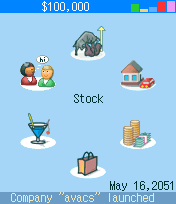
The main aim of this game is to become the richest company among all competitors. The main objects in the game are:
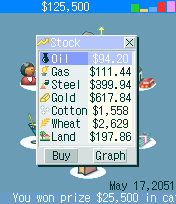
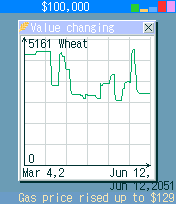
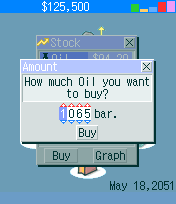
- Stock exchange - here you can buy economic resources or take a look at changes in price for them.
- Property. All of your property: economic resources (you can sell them from here), house, car, food, etc...
- Bank. Here you can take an unlimited number of credits or put money on deposit. Remember if you fail to return money before final date of credit - the game will do it automatically (the same is with deposit)
- Shop. It is like "Stock exchange", but here you can buy food, clothes, exchange your car, house, etc.
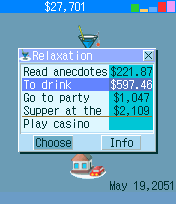
- Relaxation. Just as real businesspeople, you need to take care of your health and mood levels. So, here you can restore your health and relax. You can play at casino (to win or to waste some money)
-
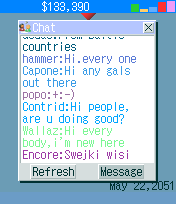
- Community. This is the place where you can chat with other players, look at "Top 10" rating, and send messages to company's owners.
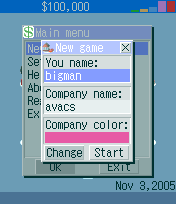
Here are some screenshots:
At the right upper corner of the screen you can see five columns. These are the levels of: food (green), clothes (orange), gas (light blue), health (red), and mood (lilac). Each month you eat 1 pack of food and wear 1 pack of clothes. Gas is needed to heat your house (the amount of gas depends on its size). Also you must sometimes watch the levels of health and mood (to increase them you must eat the best food, wear the best clothes, have a better car, or just go to "Relaxation" or to go on a yacht voyage. When one of those columns comes down, your main screen becomes yellow.
All mentioned above is only a common description of the game, but the game's world is saturated with surprises and strokes of fate.
Good luck with playing AVACS Business Life!
|
|




 Quick Register


ورود کاربران
خوش آمدید! لطفا وارد حساب خود شوید